
Introduction.
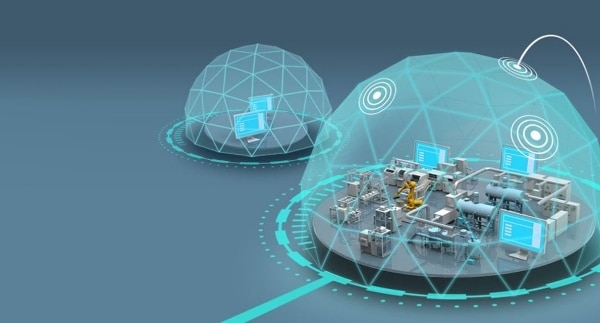
If you want to protect yourself from external attacks, a greenhouse is not the best choice. A protective shield is much safer. Likewise, it's important that you think carefully when protecting your production from external and internal attacks.
But isn't a firewall enough?
In a network installation, you always have a firewall facing the Internet. It protects us from outside attacks by generally stopping all traffic. However, we can open up specific data (TCP ports) we want, but it is not secure or we can allow outside access via VPN connections. So we do a lot to prevent attacks from outside (WAN), we take good care of our local network (LAN).
But are we really doing that?
It's nice to know that we can't be attacked from the outside, so we can rest easy, or can we? When we are told that almost all attacks on our LAN today come from the inside, what good is a firewall that protects against attacks from the outside? Can we now sleep soundly at night?
How does an attack come from within?
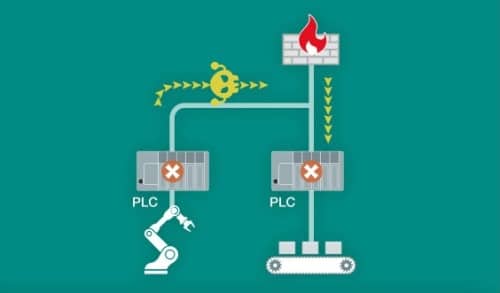
No employee thinks they are inviting an attack from within, but are they? It takes so little for us to invite and accept an attack ourselves. For example, we may have visited an attacked website on our computer, we may have installed a free programme from the internet (could be a game or technical application), opened an email with a file or an infected link, inserted a USB key into the computer, it must be safe, or is it?
These are just some of the most common ways your system can be infected or attacked.
But surely we have a backup to return to?
Obviously, in a regular office environment (IT) there are many computers and thus a high risk that someone unknowingly invites an attack. Hopefully, we have a backup, so we can quickly (days) get back to the daily life we know without much loss.
But if we also have our production (OT) on the same network, it's a completely different story. Then we can't produce as long as we're down, but worse still, what if our infected network doesn't shut down completely, but is more intelligently attacked, it starts changing the parameters of our process, so we produce useless stuff, our machine burns down or worse?
So is more Firewal the answer?
Of course, we can also set up a firewall between the IT and OT networks, but often you want to monitor or retrieve production data from your IT network from the OT network and then you still have to open up a bit. Then someone wise says - install a firewall between IT and OT, then we can't retrieve data from the IT side, we have to get it over another way, manually with a burned DVD or the OT side sends data to IT, then we're safe. Or are we?
Why is the OT network insecure if IT has no access?
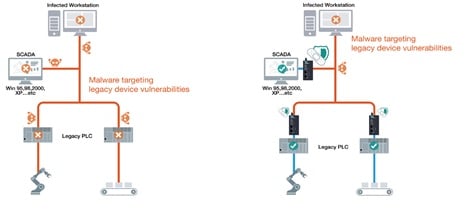
In a production network, there is often one or more computers that control and/or monitor the production/process. They often have access to the IT part, maybe even the Internet via Firewall to the IT part and further via its Firewall to the Internet. And now we're back to our previous concerns for IT, attacks don't come from the outside (Internet or IT), but from the inside (OT) via emails, programmes etc. And even worse, here in OT, many computers are older. We still see customers with Windows 7 machines that are no longer security updated, and even machines with XP. It's completely wrong.
So the solution is ”no connection to/from OT at all”?
Immediately yes, but as mentioned before, we still have a computer or PLC in OT that can be infected. Can we be sure that one day an infected USB stick will not be inserted into the machine to update or install a new programme, to update a driver, to change the configuration, to make a backup or similar? No we can't!
What do we do next?
In many places, you don't do anything, you just sit back and hope for the best. In the vast majority of cases this has gone well so far, but we are seeing more and more interest in hackers attacking production networks (OT) rather than ordinary networks (IT). Here they will be able to do more damage, have more control and ultimately collect a larger ransom to release or clean the network again.
So what is the solution?
Fortunately, Moxa now has two products that solve all our problems, EtherCatch and EtherFire. Of course, they're not free, so it's important to sit down and review your OT network. Find out what is important to protect and which computers or PLCs could be infected and launch an attack. Once you know this, you can decide which devices to install, where and how many.
EtherCatch IEC-G102-BP.
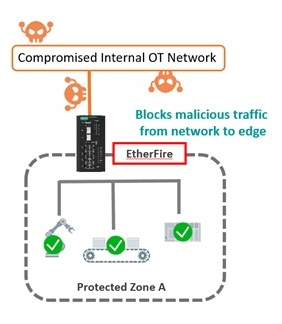
This new model is not a firewall or a router, it's an ISP (Intrusion Prevention System). ISP is a new way to secure your data, it has two Ethernet ports and basically allows all data to pass between the two ports, both ways. The security consists of either allowing specific TCP packets (e.g. Modbus packets) and blocking other packets or the device can analyse data passing through the device and give an alarm or shut down completely if there are packets or patterns that should not be there. The solution also includes a Dashboard, so you can easily get an overview of your network, whether it's healthy or not, without having to log into each device one by one.
What is ok or not ok?
Our computer has a virus scanner programme that scans all emails and files for known viruses, EtherCatch works the same way. You subscribe to different patches, which you can choose to apply manually or automatically. If EtherCatch finds something in the traffic that matches, it raises an alarm or shuts down completely, depending on how it is configured.
How do I move forward?
Initially, we have links to the product datasheets at the bottom of the page and links to the products here on our website, but give us a call, tell us a little about your installation and we will help you further.

How can I find out more (useful links)?
- Yes please, please contact me for more information (sent as email)
- Call us on 4485 8000