

Introduction.
The tSH-730 series enables two masters to communicate with the same slaves via serial RS-232/485, even at different speeds. Mobus/RTU, Modbus/ASCII, DCON, or proprietary protocols are supported.

2x Master, why is that?
In a serial network on RS-232 or RS-485, there will normally be one Master and several Slaves. It is the Master that determines which Slave will act and respond to the command sent by the Master. But with this new device from ICPDAS, the tSH-730 series, it is now possible to have two Masters at the same time.
The two Masters will be able to communicate with the same Slaves, e.g. if you have a control display at each end of a room that controls the lighting or other functions. Master 2 can also run as a backup, so that if Master 1 stops, Master 2 takes over.
Another application could be that you have two Masters and several Slaves but want to use the same RS-485 network that you have wired up. One Master is then set up to communicate with selected Slaves, while the other Master is set up to communicate with the other Slaves.
But how?
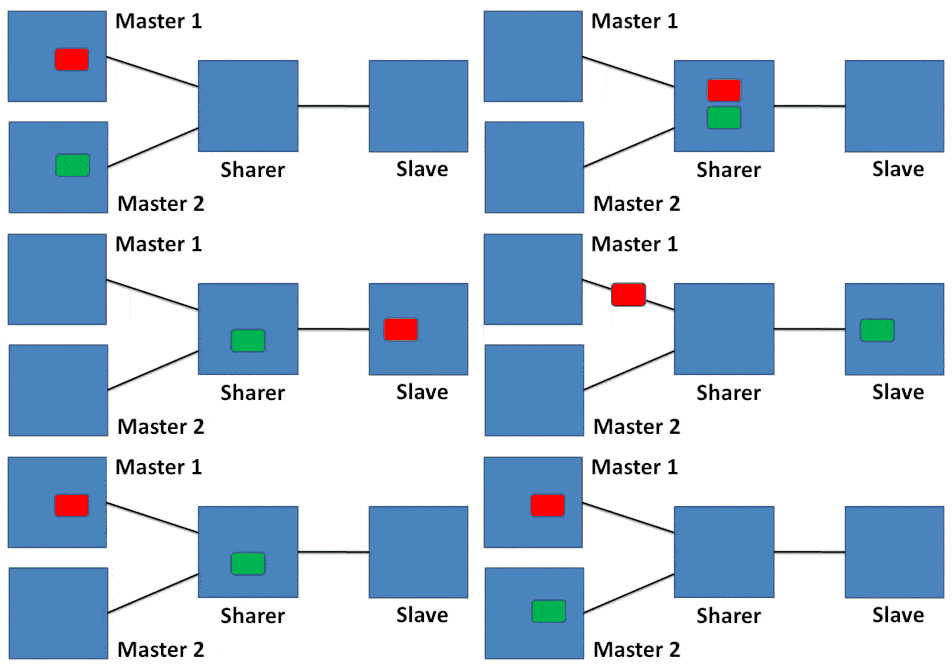
When two masters normally communicate on the same connection at the same time, data will be lost. We therefore need a buffer, and this is precisely what our tSH-730 series is. In the visual figure above, there are two masters: Master 1 sends red packets and Master 2 sends green packets.
When Master 1 sends a red packet, it is forwarded to the slaves, the selected slave responds, and the response is sent to Master 1. The same applies to Master 2.
However, when Master 1 and Master 2 send data at the same time, we have to delay one of the signals. In the example above, the red packet is sent to the slaves, while the green packet is stored for a moment.
The response to the red packet is sent back to Master 1, after which the green stored packet can be sent to the slaves and the response to this back to Master 2, without anyone noticing anything.
Please note – it is important to set a longer response timeout in the two Masters, as responses may be delayed while waiting to pass through the converter. It is also important that Master 1 and Master 2 do not use the 100% bandwidth; there must be room for both of them at the same time.

Modbus/RTU, Modbus/TCP, DCON, or your own protocol.
All slaves must run at the same speed, but the two masters can run at different speeds and do not need to be at the same speed as the slaves.
When configuring the module, which is easily done via the built-in Ethernet connector, first select the protocol and speed for Master 1, then Master 2, and finally the slaves. The protocols supported are the popular Modbus/RTU and Modbus/ASCII, ICPDAS’ DCON (I-7000 series) or your own protocol (Raw data / text mode).

How can I find out more (useful links)?
- Yes, please contact me for further details (send by email).
- Call us at 4485 8000